

If you’ve spent any time browsing productivity tools over the past few years, chances are you’ve come across Notion at least once — and probably more than once, given how much buzz it’s generated. What started as a niche note-taking app has grown into one of the most talked-about workspace tools on the market, used by everyone from solo freelancers jotting down ideas to entire companies running their operations inside it. But is the hype actually justified?
This Notion review takes an honest, practical look at what the platform actually does well, where it falls short, and who it’s genuinely the right fit for. We’ll dig into notion pros and cons, explore whether Notion as a CRM actually holds up, and walk through how to use Notion for project management — so you can decide for yourself whether it deserves a spot in your daily workflow.
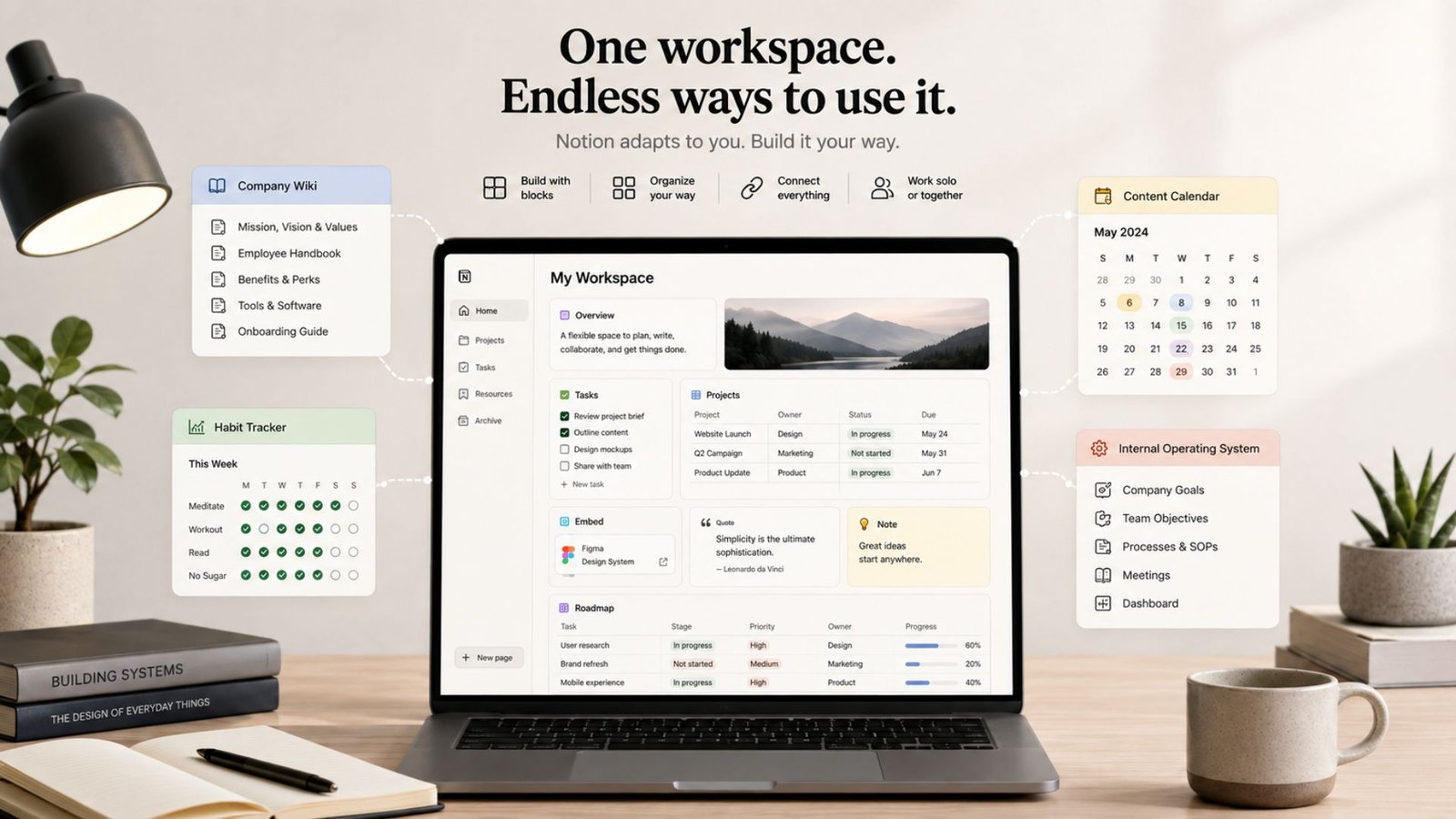
At its core, Notion is a flexible, block-based workspace. Instead of forcing you into a rigid template like most software does, Notion gives you building blocks — text, images, tables, checklists, embeds, and databases — that you can arrange however you want. That single idea is what makes Notion so different from a typical note-taking app or project management tool: it doesn’t really have a fixed identity. It becomes whatever you build with it.
For some people, that’s a personal journal. For others, it’s a company wiki, a content calendar, a habit tracker, or a full-blown internal operating system. This flexibility is both Notion’s biggest strength and, as we’ll get into, one of its most common criticisms.
The first time you open Notion, it can feel a little overwhelming. There’s no obvious “start here” button, and the blank-page freedom that makes the platform so powerful can also make it intimidating for new users. That said, Notion has invested heavily in onboarding over the past couple of years, offering guided templates and a large public template gallery that make it much easier to get moving without building everything from scratch.
Once you get past that initial learning curve, the interface itself is clean and intuitive. Pages can be nested inside other pages, creating a structure that mirrors how you naturally think — a “Work” page might contain sub-pages for projects, meeting notes, and a task tracker, all linked together seamlessly.
Before diving deeper into specific use cases, it’s worth laying out the honest notion pros and cons so you know exactly what you’re signing up for.
Pros:
Cons:
None of these drawbacks are dealbreakers on their own, but they matter depending on what you’re trying to use Notion for — which brings us to two of its most popular non-obvious use cases.
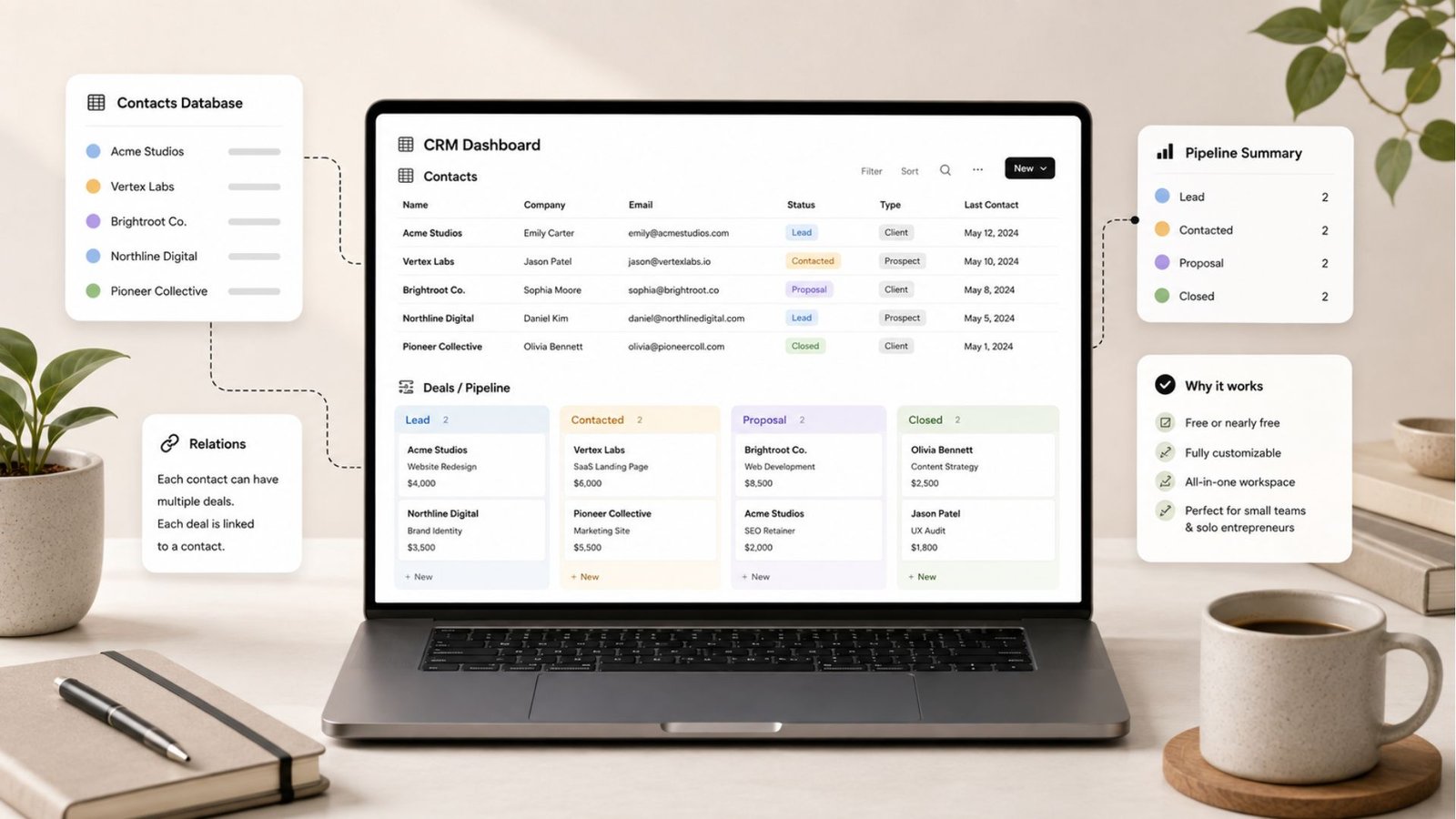
One of the more surprising ways people use Notion is as a lightweight customer relationship management system. Using Notion as a CRM isn’t something the platform was originally built for, but its relational database structure makes it a surprisingly capable stand-in for small teams and solo entrepreneurs.
Here’s how it typically works: you create a “Contacts” database with properties for name, company, email, and status, then link it to a “Deals” or “Pipeline” database. From there, you can switch to a Kanban board view and drag deals through stages like Lead, Contacted, Proposal, and Closed — essentially recreating the core function of a sales pipeline without paying for dedicated CRM software.
For freelancers, consultants, and early-stage startups, this setup is often more than enough. It’s free (or nearly free), fully customizable, and lives right alongside your other notes and project docs. The catch is scale. Once your contact list grows into the thousands, Notion’s performance starts to slow noticeably, and you’ll miss features that dedicated CRMs offer natively — things like built-in email sequencing, call logging, or automated lead scoring. If your sales operation is still small and simple, Notion as a CRM works well. If you’re managing serious sales volume, it’s worth eventually migrating to a purpose-built platform.
Project management is arguably where Notion gets the most genuine, sustained use — and understanding how to use Notion for project management is a big part of why so many teams stick with it long-term.
The typical setup starts with a central “Projects” database. Each project gets its own page, and inside that page, you can nest a “Tasks” database filtered specifically to that project. From there, most teams build out a few key views:
Board view — a Kanban-style layout showing tasks by status (To Do, In Progress, Done), perfect for a quick visual snapshot of where things stand.
Because all of these views pull from the same underlying database, updating a task in one view automatically updates it everywhere else. That single-source-of-truth structure is what makes Notion genuinely useful for project management, rather than just a pretty note-taking app dressed up as one.
For teams getting started, the smartest approach is usually to start with a template rather than building from scratch. Notion’s official template gallery includes pre-built project management setups that already have the right properties, views, and automations configured — you can always customize from there once you understand how the pieces fit together.
Notion’s AI features have matured significantly, and they’re worth calling out separately in this review. Rather than being a bolt-on chatbot, Notion AI is woven directly into the workspace. It can summarize long pages, draft meeting notes, generate first drafts of documents, and — increasingly — act as an autonomous agent that can pull information from across your linked pages to answer questions instantly.
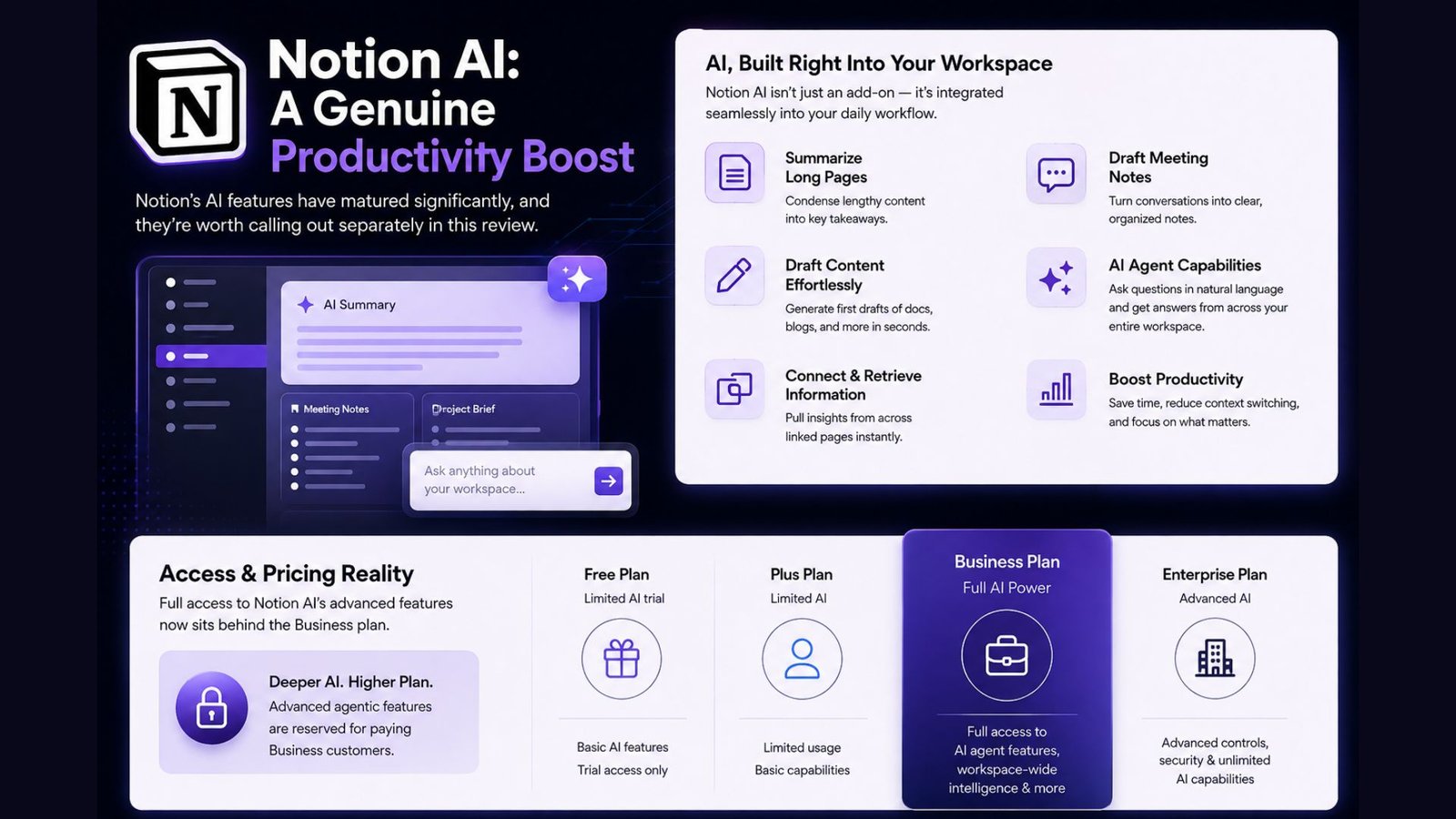
That said, full access to these AI capabilities now sits behind Notion’s higher-priced Business plan, which is a meaningful consideration for individuals or small teams on a budget. Free and lower-tier users get a limited trial, but the deeper agentic features are reserved for paying business customers.
Notion’s pricing structure is refreshingly simple compared to some of its competitors, though the free plan makes it genuinely accessible for individual users. It typically breaks down into four tiers: a free personal plan with unlimited pages and blocks; a mid-tier plan aimed at small teams that unlocks unlimited file uploads and longer version history; a business tier that bundles in full AI capabilities, single sign-on, and advanced permissions; and a custom enterprise tier for larger organizations with compliance and security needs.
For most individuals and small teams, the free or entry-level paid plan is more than enough. The jump to the business tier only really makes sense once you need the full AI suite or enterprise-grade security controls.
Given everything above, Notion tends to be the strongest fit for:
On the other hand, Notion may not be the right fit for larger sales teams that need a dedicated CRM with advanced automation, or for organizations managing massive datasets where performance at scale becomes a genuine bottleneck.
Yes, Notion offers a fully functional free plan with unlimited pages and blocks, making it genuinely usable for individuals without ever paying.
For solo entrepreneurs and small teams with a simple sales process, yes — Notion’s relational databases can recreate a basic CRM. Larger sales teams will likely need a dedicated platform eventually.
Yes, Notion handles project management well through linked databases with board, timeline, and calendar views, though it lacks some advanced automation found in dedicated PM tools like Asana or Jira.
No, full Notion AI features are bundled into the Business plan. Free and lower-tier plans only get a limited trial.
Notion has limited offline functionality — it’s built primarily as a cloud-based tool, so a stable internet connection is recommended for full functionality.
Notion has earned its reputation as one of the most versatile productivity tools available today, and this review confirms that the praise is largely deserved. Its flexibility genuinely sets it apart — few tools let you build a personal journal, a company wiki, a lightweight CRM, and a full project management system inside the exact same workspace. The tradeoffs are real, though: performance dips at scale, the learning curve isn’t trivial for brand-new users, and the best AI features now require a business-tier subscription.
For individuals, freelancers, and small teams who value customization and don’t need enterprise-scale performance, Notion remains one of the best all-in-one workspaces on the market. Larger organizations with heavier data needs or complex sales operations may eventually outgrow it — but by the time that happens, most teams have already gotten more than their money’s worth out of the platform.