

If you’ve searched for Claude for Work, chances are you’re trying to figure out whether Anthropic’s AI assistant can actually replace the patchwork of tools your team is using right now. Maybe you’ve also typed in things like “claude features,” “claude artifacts,” or “what is claude.md” while trying to piece together how this whole ecosystem fits together. This guide pulls all of that into one place.
Claude for Work is the umbrella term people use for Anthropic’s business-focused offerings — the Team and Enterprise plans that bring Claude’s chat interface, Claude Code, Claude Artifacts, and a set of admin and security controls into one subscription built for organizations instead of individual users. Below, we’ll break down exactly what’s inside, how it compares to using Claude solo, and how to decide which plan fits your team.
At its simplest, Claude for Work refers to Claude’s Team and Enterprise plans. Instead of a single person paying for a personal account, an organization sets up a workspace where every member gets a seat, and an admin manages billing, permissions, and security from one dashboard.

Every seat on a Team plan gets access to Claude on web, desktop, and mobile, along with *Claude Code* for terminal-based development work. Teams can also connect Claude to the tools they already run — think Microsoft 365, Slack, and other connectors — so Claude can pull context from real company data instead of working blind. Enterprise plans build directly on top of Team, adding single sign-on, audit logs, custom data retention, and compliance controls for larger, more regulated organizations.
The short version: if you’re comparing claude for work against a personal Claude account, the difference isn’t really about intelligence — it’s about collaboration, administration, and security at scale.
Once your organization is set up, every seat gets access to the same core toolkit that makes Claude useful day to day.
Claude Artifacts let you generate a document, a chart, a small app, or a slide deck in a separate panel next to the conversation, so you can keep iterating on it without losing your chat history. It’s genuinely one of the most requested claude features* because it turns Claude from “a chatbot that writes text” into something closer to a lightweight workspace.
CClaude tasks— the ongoing to-do items, drafts, and multi-step projects your team hands off to Claude — benefit from the same context window that lets Claude read long documents, spreadsheets, and transcripts without losing the thread. That’s what makes it possible to ask for Claude insights on a messy dataset or a long meeting transcript and actually get something usable back.
Then there’s the thinking process itself. When people search “*claude keep thinking*,” they’re usually referring to extended or step-by-step reasoning — Claude working through a problem methodically before answering, which matters most for complex analysis, planning, or debugging rather than quick questions.
This is where a lot of the keyword traffic around claude for work actually lives, because *Claude Code* is bundled into every Team seat rather than sold separately.
Claude Code is a command-line tool that lets developers hand off coding tasks directly from the terminal, an IDE, or the desktop app. It’s built to be transparent: by default, it’s read-only and asks for your approval before editing files or running commands, so you’re never surprised by what changed.
A few specific features come up constantly in searches, so let’s clear them up:

It’s a Markdown file you place at the root of your project where you write down project rules — coding style, folders Claude shouldn’t touch, preferred test commands, or recurring context like API base URLs. Claude Code reads it automatically at the start of a session, which is why teams treat it as a shared rulebook rather than a one-off prompt.
Plan mode in Claude Code. “What is plan mode in Claude Code” is one of the most common questions out there, and the answer is straightforward: instead of jumping straight into editing files, Claude first lays out a step-by-step plan for how it intends to solve the problem. You review that plan, approve or adjust it, and only then does the actual coding happen. This is exactly the kind of claude code thinking mode* people are hunting for when they search “planning mode claude code” — it separates the “figuring out what to do” step from the “actually doing it” step.
Running Claude Code with sandboxing enabled gives it a sandboxed environment for filesystem and network access, which cuts down on repeated permission prompts while still keeping firm boundaries around what it can touch. It’s the safer middle ground between approving every single action and giving Claude free rein.
The Claude GitHub connector.Teams that live in pull requests can connect Claude Code to their GitHub repositories, letting it read issues, review code, and open PRs as part of a normal workflow instead of copy-pasting code back and forth.
The “ask user question” behavior.* When Claude Code hits a genuinely ambiguous decision — say, two valid ways to structure a function — it’s designed to pause and ask you rather than silently guessing. That single habit is a big part of why developers trust it with real, “claude code everything” style, do-it-all workflows instead of just small snippets.
So can Claude write Python code, or JavaScript, or Go? Yes — Claude Code works across most mainstream languages and frameworks, and for many developers it’s become the default way to explore an unfamiliar codebase, not just write new code from scratch.
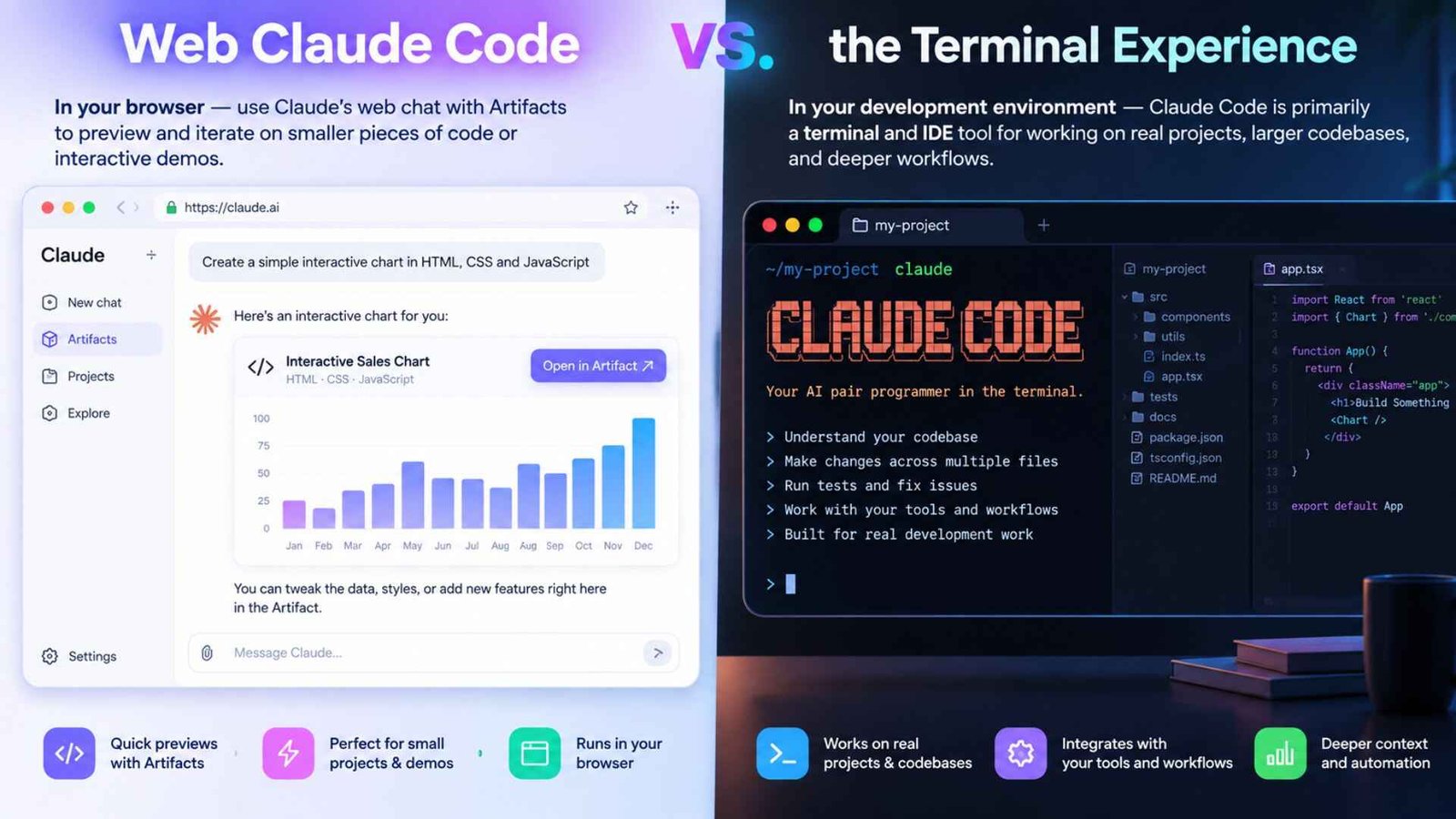
A common point of confusion is “*web claude code*” — people expect a full coding IDE inside the browser. In practice, Claude Code is primarily a terminal and IDE tool, while Claude’s web chat is where you’d use Artifacts to preview and iterate on smaller pieces of code or interactive demos. They’re complementary, not competing products: one lives in your development environment, the other lives in your browser tab.
This question comes up so often it’s worth answering directly. *Claude* is the general-purpose assistant — the chat interface you use for writing, research, analysis, and everyday questions. Claude Code is a specialized tool built specifically for software development, running in your terminal or IDE with direct access to your project files, git history, and command line.
Think of it this way: Claude is the conversation, and Claude Code is Claude doing hands-on work inside your codebase. On a *Claude for Work* plan, you’re not choosing one or the other — both are included, and most teams use them side by side depending on the task in front of them.
If you’re comparing plans, the practical differences come down to team size, security needs, and how much usage you expect.
Team plans* are built for organizations of roughly 5 to 150 people. Standard seats include Claude Code, connectors, and everything in a personal plan, just with more usage headroom. Premium seats offer meaningfully more usage for people running heavier workloads — think a developer running long Claude Code sessions all day versus someone who checks in a few times.

Enterprise plans include everything in Team, then layer on single sign-on, domain verification, role-based permissions, audit logs, and custom data retention controls, which matters a lot for regulated industries or larger companies with strict IT policies.
A quick note on naming: you may see people search for a claude ultra plan, but Anthropic doesn’t currently sell a plan by that name. If you’re after the highest usage tier for an individual power user, that’s typically the Max plan; for teams, it’s Team or Enterprise. Worth double-checking current plan names directly on Anthropic’s pricing page before you commit, since offerings do get updated.
Getting More Out of Claude for Work
A few habits separate teams that get real value from Claude for Work from teams that use it like a slightly smarter search bar:
1. Write a real CLAUDE.md. Don’t leave it blank — document your conventions once, and every future session benefits.
2. Use plan mode for anything non-trivial.* Reviewing a plan before code gets written saves far more time than it costs.
3. Connect your actual tools.* A connector to your GitHub repo or your shared drive turns Claude from a blank-slate assistant into one that already knows your context.
4. Let Claude ask questions. If a task is ambiguous, resist the urge to over-specify everything up front — Claude Code is designed to check in when it needs to.
5. Match the seat to the workload. Give your heaviest users premium seats rather than spreading usage thin across the whole team.
Some teams also get a first real taste of these workflows at a *Claude hackathon* or internal workshop, which tends to be the fastest way to get non-technical staff comfortable with what Claude Code and Artifacts can actually do. If you want a broader look at community-built tools and workflows, searching for resources like “awesome claude code” lists on GitHub can surface templates and setups other developers have shared — just treat community content as a starting point, not an official source.
No. Claude for Work is the business subscription (Team or Enterprise) that includes Claude’s chat interface, Artifacts, connectors, admin controls, and Claude Code all together. Claude Code is just one part of that bundle — the piece built specifically for software development.
It’s a project-level Markdown file that stores your coding standards, restricted folders, and preferred workflows. Claude Code reads it automatically, so your whole team gets consistent behavior without repeating instructions in every session.
Instead of editing files right away, Claude first writes out its intended approach as a plan for you to review. You can adjust it before any code changes happen, which is especially useful for larger or riskier changes.
Yes. Claude Code can navigate an existing Python codebase, write new modules, and run tests, making it useful for both small scripts and larger, ongoing projects — not just isolated code samples.