

85

EXPERT SCORE

Landing Page Builder
🏆 #1 Ranked 2026

Instapage Review: Is It Worth the Price for Lead Generation in 2026?

by, BestDigiTools Team
Updated August 25, 2026
⏱ 8 min read
79$

Starting /mo

99.9%

Uptime SLA

91

Avg Speed

24/7

Live Support

Our Verdict

A Premium, Conversion-Focused Builder — If The Price Fits Your Budget

Instapage has carved out a reputation as the landing page builder serious performance marketers reach for when every percentage point of conversion rate matters. Its pixel-perfect drag-and-drop editor, reusable Global Blocks, and server-side A/B testing put it a step above most general-purpose page builders, and its AdMap® tool — which maps individual ad creatives to matching landing pages — is genuinely hard to find anywhere else.

  • Genuinely pixel-perfect editor with precise, code-free control over layout
  • AdMap® links ad creatives directly to matching landing pages for tighter message match
  • Reusable Global Blocks and custom fonts speed up building multi-page campaigns
  • Server-side A/B testing and heatmaps built directly into the platform
  • 14-day free trial, no credit card commitment traps buried in fine print
  • No free plan — cheapest tier starts at 99/month(79 billed annually)
  • Best optimization tools (AdMap®, heatmaps, Global Blocks) are locked behind the Optimize plan
  • Traffic caps on lower tiers (commonly 30,000 unique visitors) can trigger overage costs
  • Doesn't generate full pages or funnels from a prompt, unlike newer AI-native builders

Performance Scores

Overall Score
84%
Instapage earns its score through depth rather than breadth — it's not trying to be an all-in-one funnel platform, it's trying to be the best possible tool for one specific job: building and optimizing landing pages that convert.
Speed & Performance
90%
Published pages load quickly thanks to Instapage's CDN-backed hosting, and the editor itself stays smooth even on pages built with several Global Blocks and custom sections.
Uptime Reliability
92%
Enterprise-grade infrastructure keeps downtime rare, which matters most during paid ad campaigns where even a short outage can burn ad spend with nowhere for traffic to land.
Customer Support
82%
Support is generally responsive and knowledgeable, though a few reviewers note slower response times outside business hours compared to the platform's premium price tag.
Ease of Use
88%
The drag-and-drop editor is genuinely intuitive, and most users report launching their first page within a single session, even without design experience.
Value for Money
74%
This is where Instapage draws the most criticism. The core features are strong, but locking optimization tools like AdMap® and heatmaps behind the higher-priced Optimize plan makes the entry tier feel incomplete for the asking price.

Key Features

Pixel-Perfect Drag-and-Drop Editor
Build landing pages with precise control over spacing, layout, and design elements, without touching code.
AdMap®
Automatically map each ad creative to its matching landing page, keeping message match tight across campaigns — a feature few competitors replicate.
Global Blocks
Edit a reusable design element once and have the change apply across every page that uses it, useful for maintaining brand consistency across large campaigns.
Server-Side A/B Testing
Run split tests on page variations with results tracked directly inside the platform, no separate analytics tool required.
Heatmaps
See exactly where visitors click, scroll, and drop off on a page, so design changes are based on real behavior rather than guesswork.
Custom Fonts & Branding Controls
Upload custom fonts and maintain consistent branding across every page in a campaign.

Pricing Plans

Plan
Price/mo
Unique Monthly Vsitors
Popular
Best For
Create

$79

15,000 unique monthly visitors

Website & landing page builder

Kickstart your digital marketing with all the essential tools you need

Optimize

$159

Server-side A/B testing

Optimize conversions with experimentation and lead generation

Convert

Custom

Custom unique monthly visitors

Enterprise-ready platform

Maximize growth and ROI with an enterprise-ready platform

Detailed Review

Instapage Review: Is It Worth the Price for Lead Generation in 2026?

If you’ve searched anything close to instapage review lately, you’ve probably noticed the same thing I did: most of these articles either read like a sales page in disguise or they’re so generic you can’t tell if the writer actually opened the tool. So I spent real time inside Instapage — building pages, testing the editor, digging through pricing tiers — to give you a straight answer on whether it’s worth your ad budget.

This review covers what the instapage landing page builder actually does well, where it falls short, what you’ll really pay, and whether it holds up against the competition when your goal is building best lead generation landing pages that don’t bleed your ad spend.

What Is Instapage?

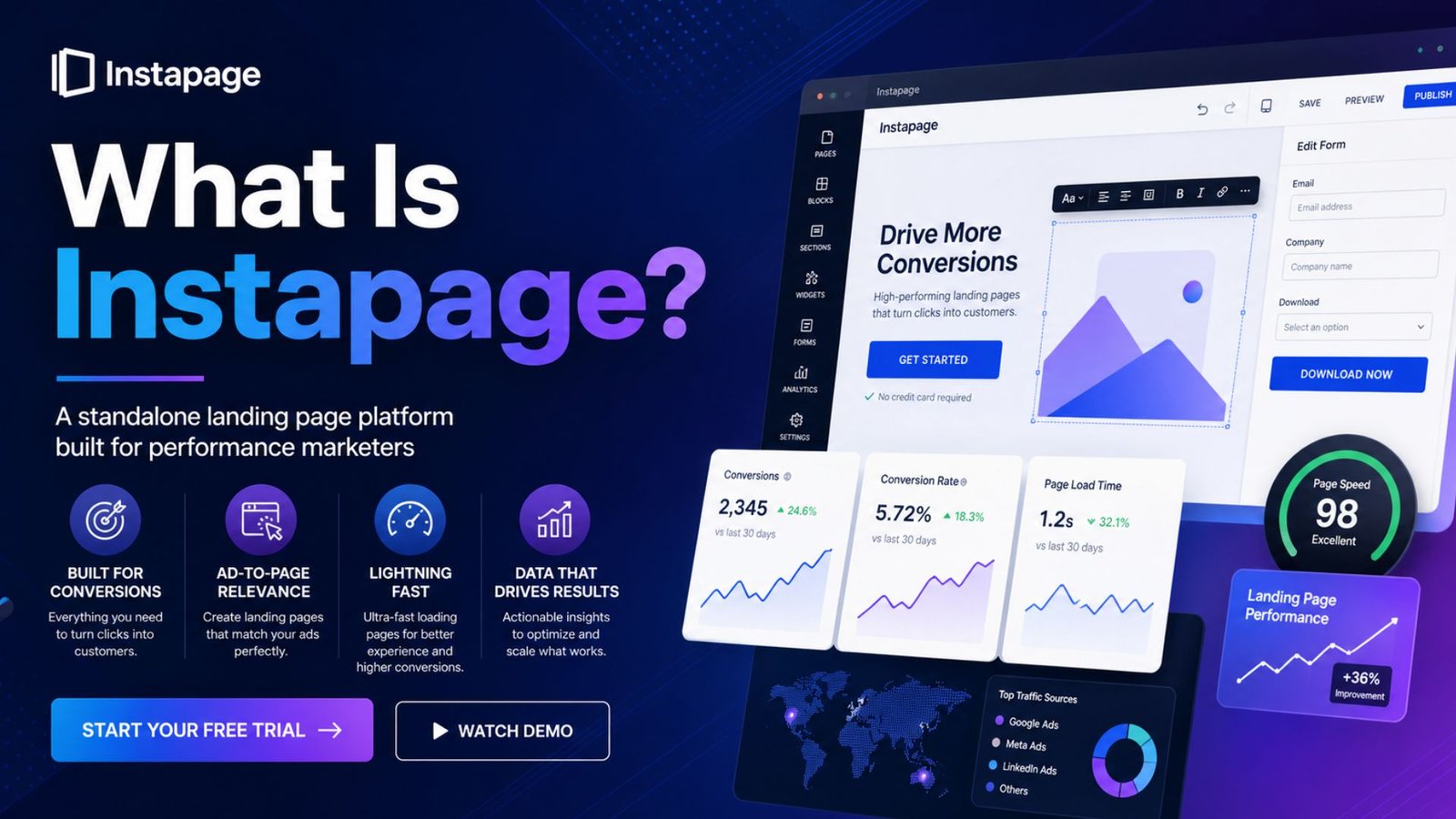
Let’s start at the beginning, since a lot of people land here without fully knowing what is Instapage in the first place. Instapage is a standalone landing page platform built specifically for performance marketers — the kind of people running paid campaigns on Google, Meta, or LinkedIn who need a page that matches the ad, loads fast, and converts. It’s not a website builder, and it’s not trying to be one. It does a single job: turn ad traffic into leads or sales.
What Is Instapage?

What sets Instapage apart from a lot of competitors is its focus on ad-to-page relevance. The platform was built around the idea that a landing page should feel like a direct continuation of the ad someone just clicked, not a generic template that happens to be live on the internet.

Instapage Landing Page Builder: Features Breakdown

Here’s where I actually got my hands dirty. A few features stood out enough to mention specifically:

AdMap. This is Instapage’s signature feature, and it’s genuinely different from what you’ll find in most other builders. AdMap visually maps your ad campaigns directly to specific landing pages, so you can see — and manage — the connection between what someone clicked and where they landed, all from one dashboard. If you’re running dozens of ad variations, this alone can save hours of manual tracking.

Reusable blocks. Instead of rebuilding the same header or testimonial section across twenty different pages, you create a block once and reuse it everywhere. Update the block, and it updates across every page using it — a small thing that saves a surprising amount of time once you’re managing more than a handful of campaigns.

Server-side A/B testing. Rather than relying on JavaScript that can slow down page load (and hurt your Quality Score on paid ads), Instapage runs its testing server-side. It’s a technical detail, but it matters for page speed, which directly affects both conversion rate and ad costs.

AI content assistance. Instapage has leaned into AI-generated copy suggestions, though it’s worth noting this is more of an assist tool than a full page generator — you’re still building the structure yourself, just with help writing headlines and body copy faster.

Dynamic text replacement. Similar to what you’ll find in competing tools, this swaps in keywords from your ad or search query directly into your landing page headline, which keeps the messaging consistent from click to conversion.

How Much Does a Landing Page Cost? Instapage Pricing Breakdown

This is usually the question that actually decides things, so let’s answer how much does a landing page cost with Instapage specifically, using current numbers.

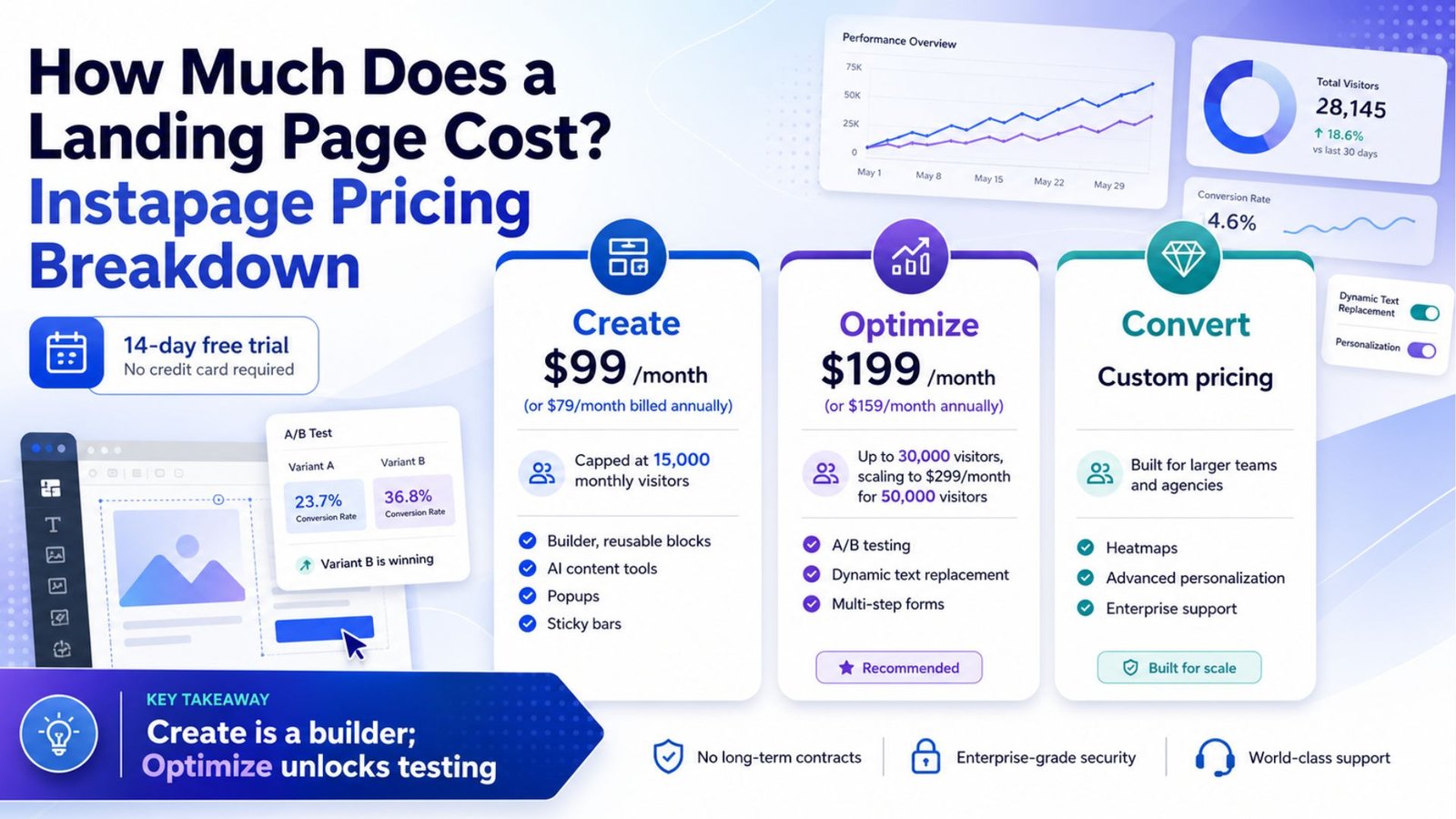
Instapage runs on three tiers:
How Much Does a Landing Page Cost? Instapage Pricing Breakdown

  • Create — $99/month (or $79/month billed annually), capped at 15,000 monthly visitors. This includes the drag-and-drop builder, reusable blocks, AI content tools, popups, and sticky bars.
  • Optimize — $199/month (or $159/month annually) for up to 30,000 visitors, scaling to $299/month for 50,000 visitors. This is the tier where things actually get interesting — A/B testing, dynamic text replacement, and multi-step forms all unlock here.
  • Convert — custom pricing. Built for larger teams and agencies, with heatmaps, advanced personalization, and enterprise-level support. You’ll need to talk to their sales team for a quote.

There’s a 14-day free trial across the board, which is enough time to build and test at least one real campaign before committing your card.

Here’s the part worth flagging clearly: the entry-level Create plan is a page builder, not a testing platform. If your whole reason for wanting Instapage is data-backed optimization, you’re really shopping for the $199/month Optimize tier, not the $99 one. That’s a meaningfully different price point than what most comparison articles lead with.

Building the Best Lead Generation Landing Pages with Instapage

If your goal is putting together best lead generation landing pages, Instapage gives you the right raw materials — but the tool alone won’t do the strategic thinking for you. A few things I noticed that actually move the needle on lead gen specifically:

  • Form flexibility. Multi-step forms (available from the Optimize tier up) reduce the intimidation factor of a long form by breaking it into smaller steps, which consistently performs better for capturing leads than one long wall of fields.
  • Personalization at scale. Because AdMap connects ad campaigns directly to page variants, you can tailor your lead-gen offer messaging by audience segment without manually building a dozen near-identical pages from scratch.
  • Speed. Lead gen campaigns often live or die on page load time, especially on mobile. Instapage’s infrastructure is built with this in mind, and pages generally load fast without extra optimization work on your end.

If you’re coming from a tool with looser template structures — say, comparing leadpages templates against what Instapage offers — you’ll notice Instapage’s templates lean more toward clean, conversion-tested layouts rather than sheer volume of options. Leadpages tends to win on raw template count and price accessibility; Instapage tends to win on the optimization layer sitting behind the page.

How to Drive Traffic to Your Landing Page (and Actually Convert It)

A landing page builder only solves half the equation. The other half is knowing how to drive traffic to landing page offers in a way that doesn’t waste the work you put into building it. A few approaches that pair well with a tool like Instapage:

  1. Match your ad copy to your headline. This sounds obvious, but it’s the single biggest lever for reducing bounce and improving Quality Score on platforms like Google Ads. Dynamic text replacement handles this automatically if you set it up correctly.
  2. Retarget page visitors who didn’t convert. Someone who landed on your page but bounced is a warmer lead than cold traffic. Pixel-based retargeting through Meta or Google can bring a meaningful chunk of that traffic back.
  3. Use organic channels alongside paid. Email, SEO content, and even the kind of Facebook group traffic marketers build over time can drive free, warm visitors to the same landing page — no ad spend required.
  4. Test before you scale spend. This is where Instapage’s A/B testing actually earns its keep. Send a modest budget to two page variants, let the data settle, then push real spend behind the winner instead of guessing.

Instapage vs. Competitors: Where It Actually Stands Out

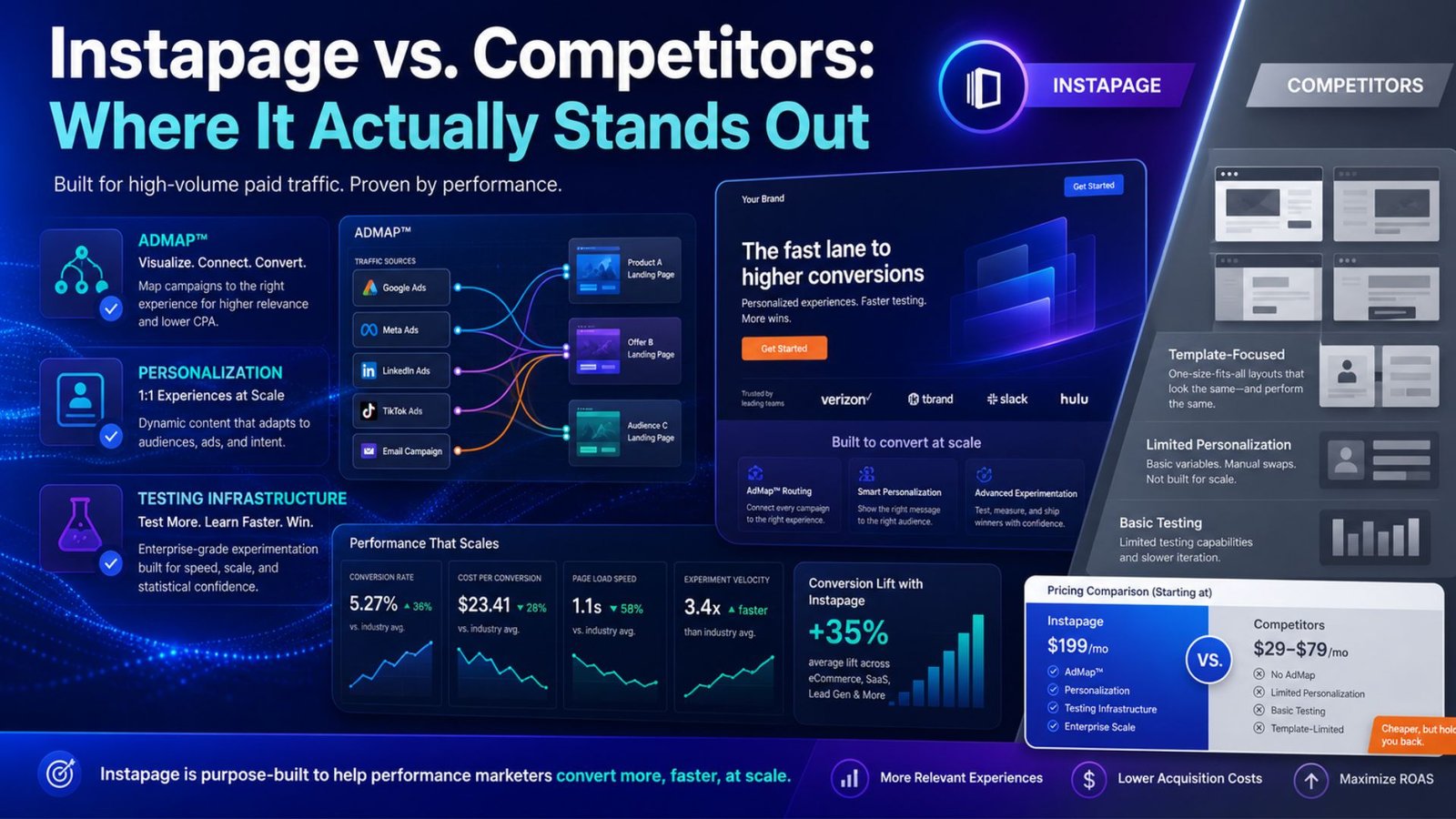
Instapage isn’t cheap, and it’s worth being upfront about that. Compared to platforms offering broader leadpages templates libraries at a lower entry price, Instapage costs more and gates core optimization features behind its second tier. What you’re paying for is the AdMap system, server-side testing infrastructure, and a platform built specifically around high-volume paid traffic rather than general-purpose page building.
Instapage vs. Competitors: Where It Actually Stands Out

If you’re spending serious money on ads — realistically $10,000 or more a month — the AdMap and personalization tools tend to justify themselves through better ad relevance scores and lower cost-per-click. If you’re just starting out or running a handful of campaigns on a modest budget, the pricing gap between Instapage and cheaper alternatives is harder to justify.

Pros and Cons

What I liked:

  • AdMap makes managing dozens of ad-to-page connections genuinely easier
  • Server-side testing keeps pages fast, which protects Quality Score
  • Reusable blocks save real time across multi-page campaigns
  • Multi-step forms noticeably improve lead capture rates

What held it back:

  • A/B testing and dynamic text replacement aren’t on the entry plan
  • Visitor caps mean costs can climb faster than expected with growing traffic
  • Heatmaps are locked behind the custom-priced Convert plan
  • Pricing sits above several direct competitors at every tier

Who Should Use Instapage?

This tool makes the most sense for performance marketers and agencies running consistent paid traffic who need to manage many campaigns at once. If you fit that profile, the Optimize tier is realistically where you should start — the Create plan alone won’t give you the testing tools that make Instapage worth choosing over cheaper builders.

If you’re a smaller business building your first few landing pages on a limited budget, it’s worth comparing the numbers here against other tools before committing, since the gap in both price and feature access at the entry level is real.

Final Verdict

Instapage earns its reputation with marketers who run high volumes of paid traffic and need tight control over ad-to-page relevance — AdMap alone is hard to find elsewhere in this category. But it’s not the tool for everyone, and the pricing structure makes that clear: you’re really buying into the $199/month tier if optimization is the whole point of the purchase. If your campaigns and budget match that profile, it holds up well in 2026. If not, it’s worth shopping the alternatives first.

Frequently Asked Questions

What is Instapage used for? Instapage is used to build standalone landing pages for paid ad campaigns, with tools focused on matching ad messaging to page content and testing which page variants convert best.

How much does a landing page cost with Instapage? Plans start at $99/month for the Create tier (15,000 visitors), scale to 199–299/month for the Optimize tier with A/B testing included, and go to custom pricing for the enterprise-level Convert plan.

Is Instapage better than Leadpages? It depends on your priority. Leadpages generally offers a larger template library at a lower price point, while Instapage focuses more on ad-to-page personalization and testing infrastructure for teams running heavier paid traffic.

Do I need Instapage if I’m just starting with lead generation? Not necessarily. The core testing and personalization tools that make Instapage worth the price sit on the $199/month plan, so smaller budgets may get more value starting with a cheaper builder until traffic volume justifies the upgrade.

Table of Contents

EXPERT SCORE

85
Instapage
Starting at 79$/mo

*Price with our exclusive link. May change anytime.