

HubSpot review searches have been climbing for a simple reason: more businesses are looking past spreadsheets and disconnected tools for something that actually holds their sales and marketing data together. HubSpot built its name on exactly that idea. What started in 2006 as a fairly basic inbound marketing tool has turned into a full platform that handles email campaigns, deal tracking, customer support, and even website content, all from one login.
That’s a big promise, though, and not every business needs (or can afford) everything HubSpot offers. This HubSpot review CRM walks through what it actually does well, where it falls short, what implementation looks like in practice, and how the pricing tiers stack up, so you’re not left guessing whether it fits your team.
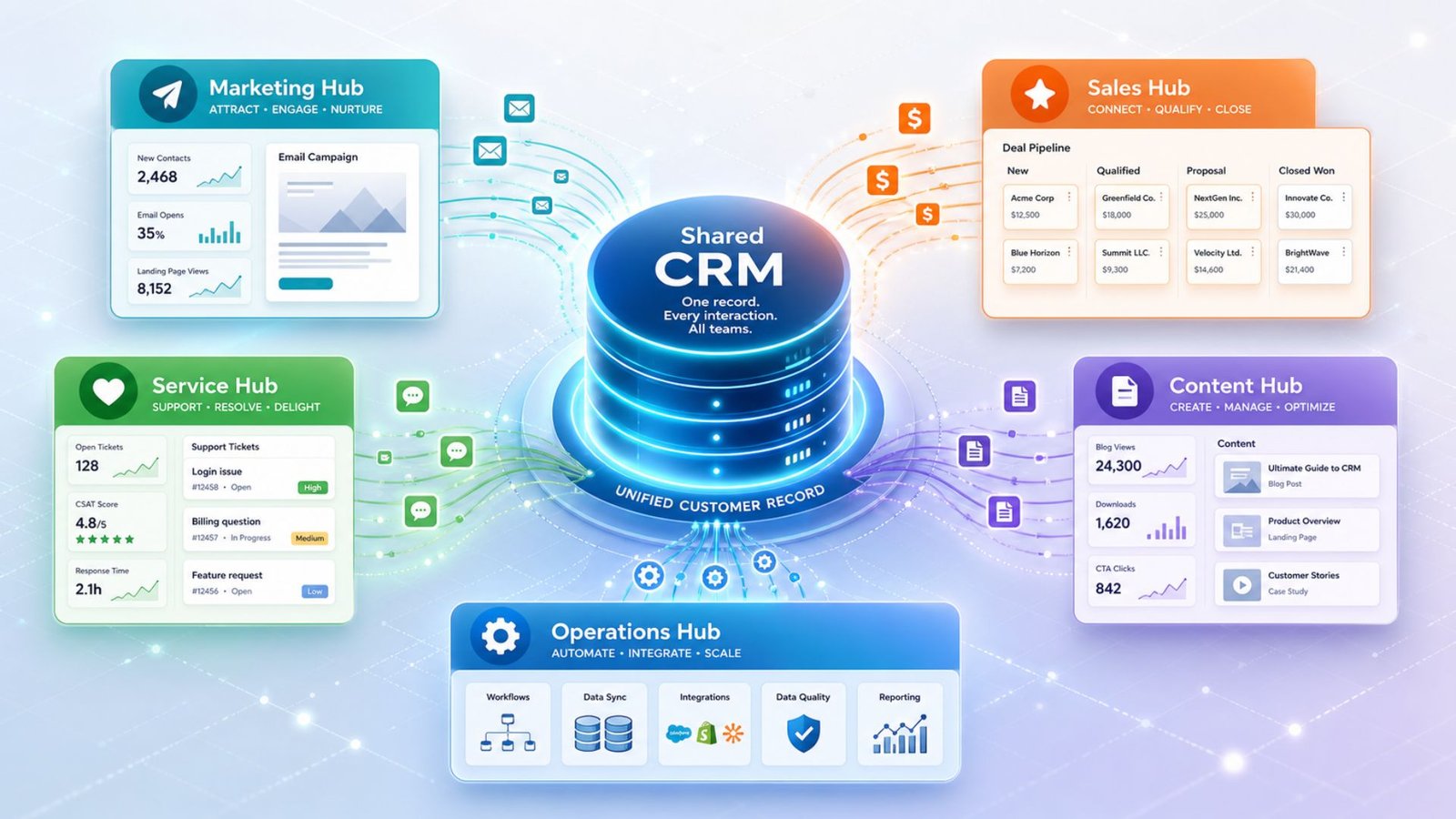
HubSpot started as an inbound marketing platform back in 2006 and has since grown into a full-blown business operating system. Today, it offers separate but connected “Hubs” — Marketing Hub, Sales Hub, Service Hub, Content Hub, and Operations Hub — all built on top of a shared CRM database. That shared foundation is what sets HubSpot apart from most competitors: every email you send, every deal you close, and every support ticket you resolve lives in one unified customer record.
For businesses tired of juggling five different tools that don’t talk to each other, that unification is a genuine selling point.
Key Reasons Businesses Choose It
So, why HubSpot specifically, when there are dozens of CRMs on the market? A few reasons come up again and again in customer feedback:
That said, “why HubSpot” also has a flip side worth mentioning upfront: cost. We’ll get into that in detail later, but it’s a factor that shapes almost every decision around this platform.
One of the more underrated aspects of choosing a CRM is how difficult — or easy — it is to actually get up and running.
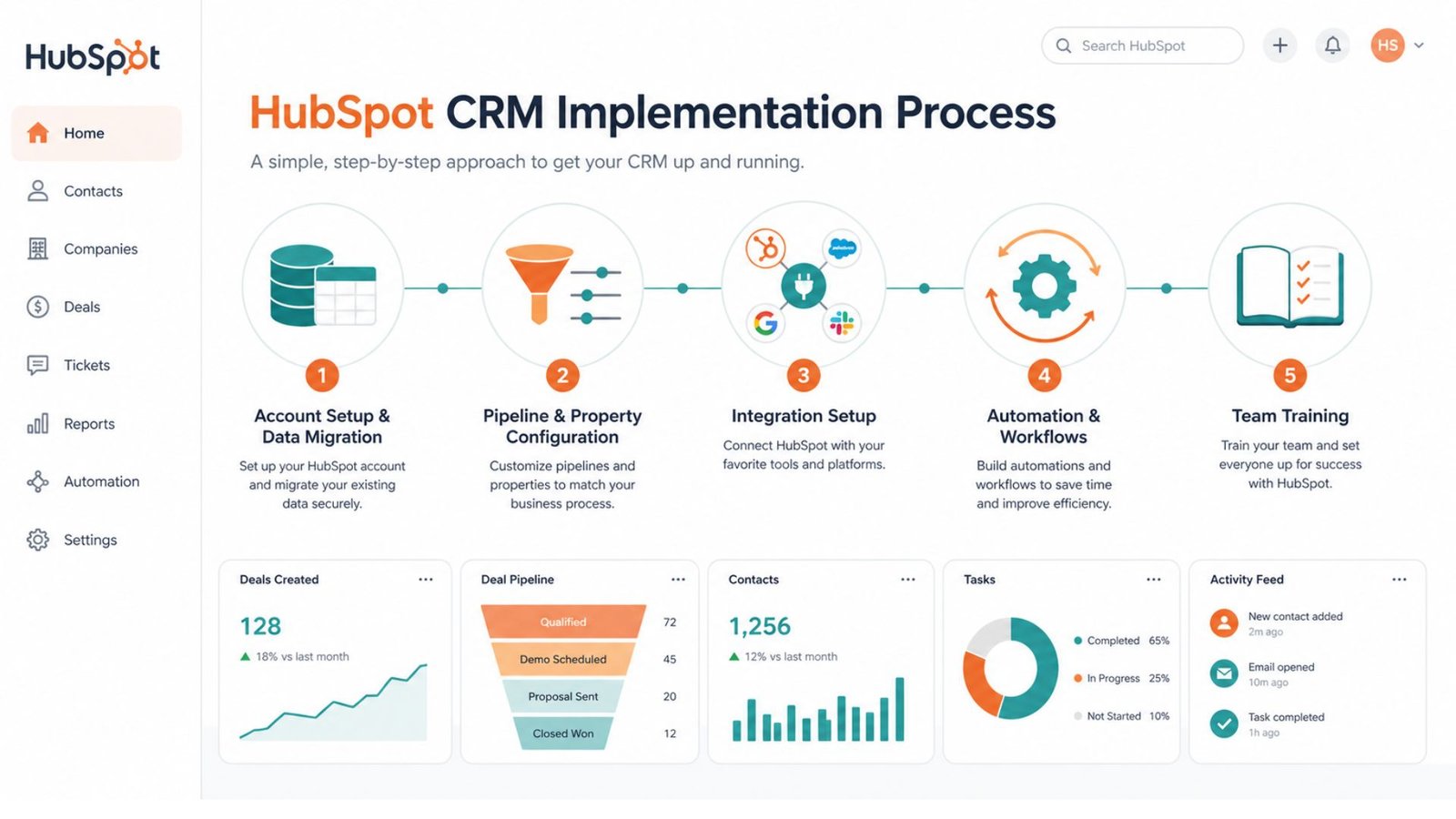
The HubSpot implementation process typically follows a few key stages:
For small teams, this process can realistically be done in a few days using HubSpot’s guided onboarding tools. Larger organizations with complex data structures or custom integrations, especially those on Professional or Enterprise plans, often work with a HubSpot partner agency — which is partly why HubSpot charges a mandatory onboarding fee on its higher tiers. It’s an added cost, but it does reduce the risk of a messy, half-finished setup.
.
Let’s talk specifics. The benefits of using HubSpot as your core CRM go beyond just “it looks nice.” Here’s what actually moves the needle for most teams:
For sales teams specifically, the visibility into where every deal stands — without digging through someone else’s inbox — is often cited as the single biggest time-saver.
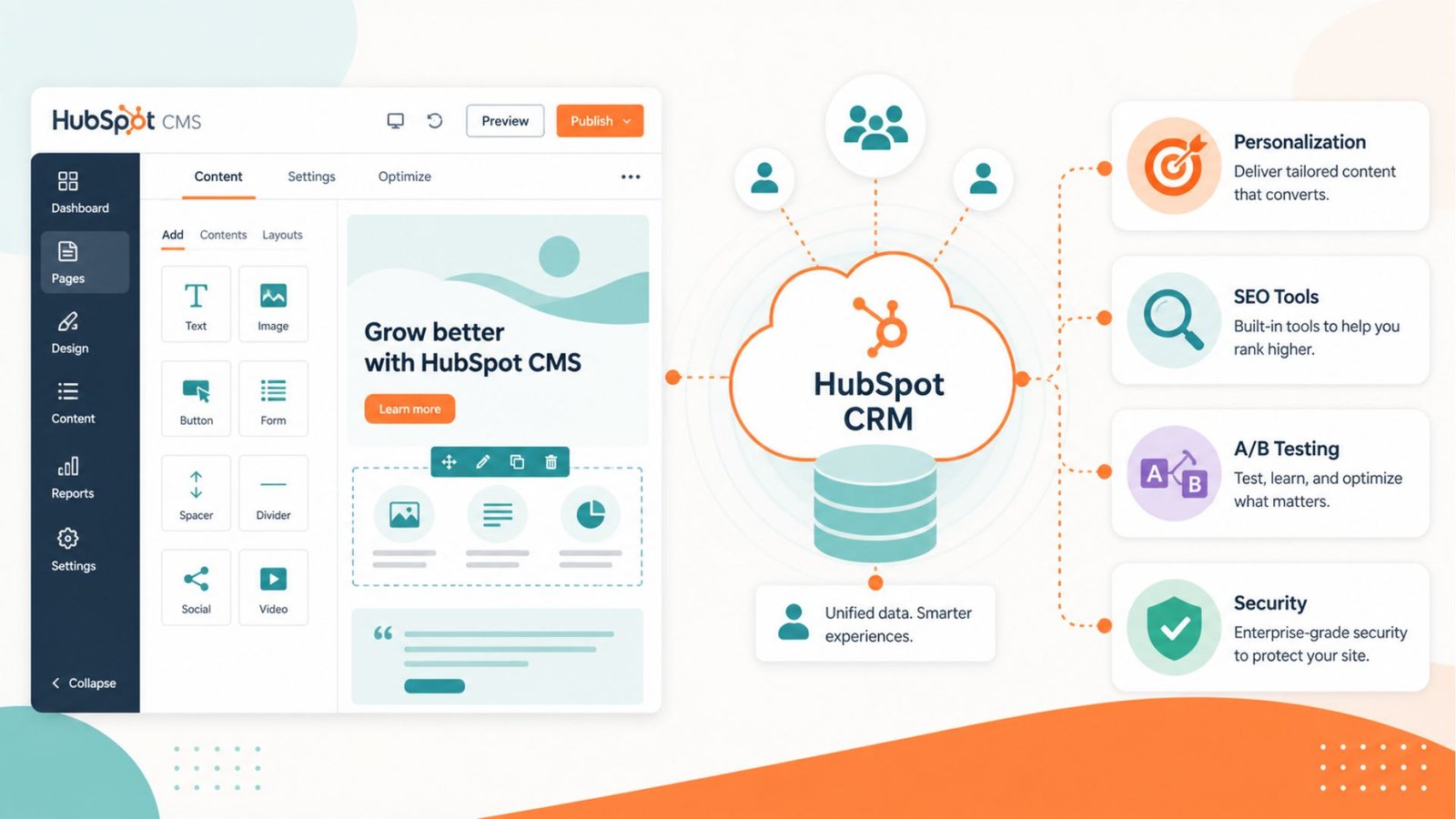
Beyond the CRM itself, the benefits of using HubSpot CMS are worth a separate mention if you’re also considering it for your website. HubSpot’s Content Hub lets marketing teams build and edit pages without needing a developer for every small change. Because the CMS sits on the same database as your CRM, you can personalize website content based on a visitor’s stage in the buyer journey — something that’s much harder to pull off with a standalone website builder connected to a separate CRM through third-party plugins.
It also comes with built-in SEO recommendations, A/B testing, and enterprise-grade security, which appeals to marketing teams that don’t want to manage a separate WordPress stack alongside their CRM.
This is one of the most searched comparisons for a reason: the jump between tiers is significant. Understanding HubSpot Marketing Starter vs Professional clearly can save you from an expensive surprise.
Starter ($20/month per seat, billed annually) gets you:
Professional (roughly $890/month, billed annually, plus a mandatory onboarding fee) adds:
The gap between these two tiers is steep — often the single biggest shock for small businesses evaluating HubSpot. Starter is genuinely affordable and covers a lot of ground for solo marketers or small teams. Professional is built for businesses that need serious automation and attribution reporting, and the pricing reflects an enterprise-oriented feature set, even though it’s technically a “mid-tier” plan.
To keep things balanced, here’s an honest look at the pros and cons of HubSpot CRM based on real usage patterns across different business sizes.
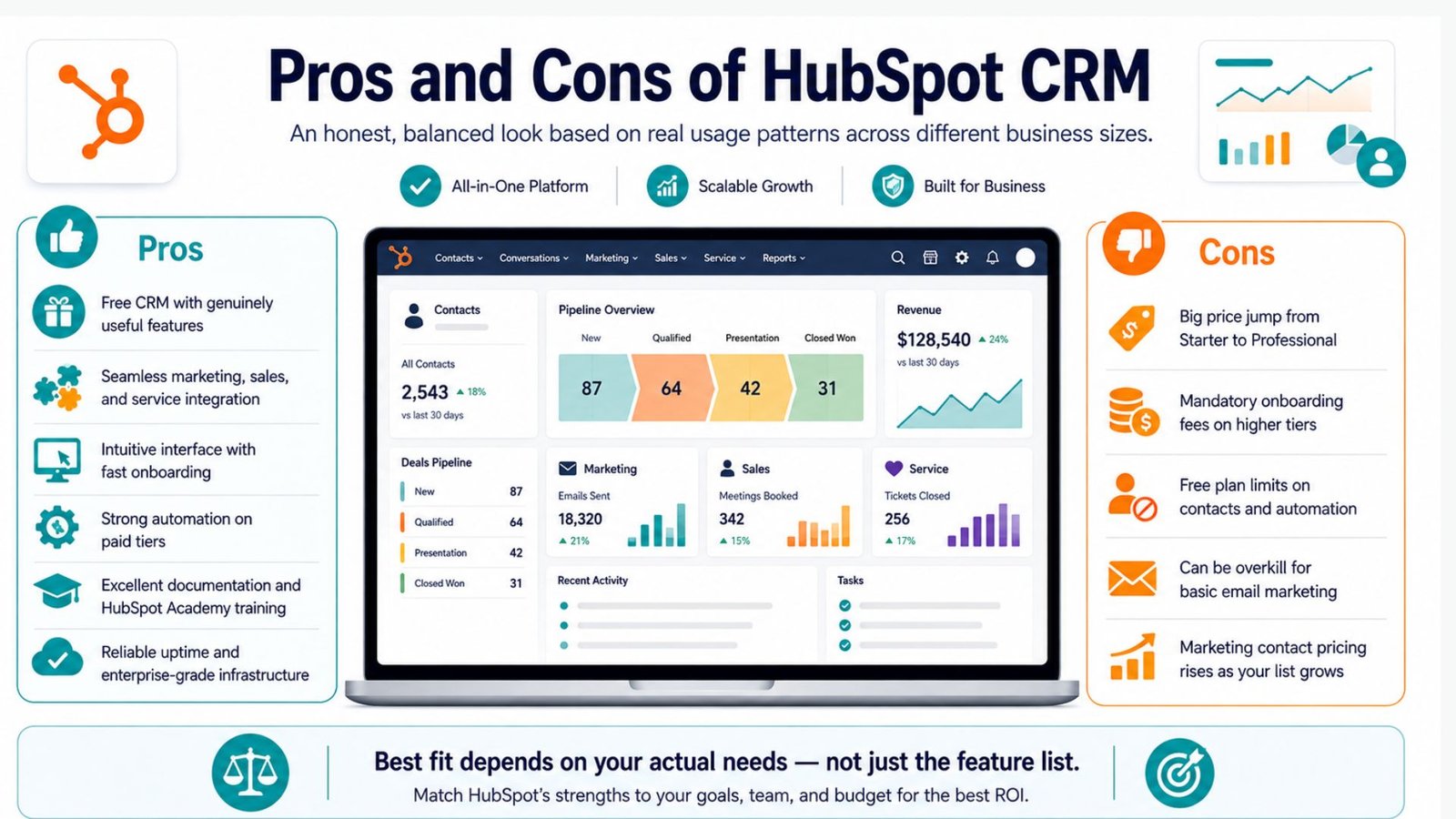
Pros:
Cons:
Weighing these against your actual needs — rather than the feature list alone — is the key to a good decision here.
Startups have unique constraints: limited budget, small teams, and the need to scale fast without re-platforming every year. Looking at HubSpot CRM for startups reviews across various business forums and review sites, a consistent pattern emerges.
Early-stage startups tend to love the free CRM and Starter tier because it gives them professional-grade tools without upfront cost. HubSpot also offers a startup discount program for eligible venture-backed companies, which can meaningfully offset the Professional and Enterprise pricing.
The friction usually shows up around the Series A or B stage, when a startup’s contact list and automation needs outgrow the Starter plan, and the jump to Professional pricing becomes a real budget conversation. Founders who anticipate this early — and budget for it — tend to have a much smoother experience than those caught off guard by the price gap.
When you evaluate the CRM company HubSpot on CRM for small businesses, the picture is generally favorable, with a few caveats. Small businesses benefit most from:
Where small businesses run into trouble is scaling past the free plan’s contact and automation limits without fully understanding what Professional-tier pricing looks like. Is HubSpot a good CRM for small businesses, then? For businesses with straightforward sales processes and modest marketing needs, yes — particularly if they stay on Free or Starter. For businesses that need heavy automation, custom reporting, or a large contact list, it’s worth running the numbers against alternatives before committing.
Stepping back from tier-by-tier analysis, is HubSpot a good CRM in the bigger picture? Based on its market position, customer base, and consistent product investment, yes — it’s one of the most complete platforms available. The core strength isn’t any single feature; it’s the fact that marketing, sales, and customer service all operate from the same source of truth. That reduces the kind of data silos that quietly kill deals and frustrate customers.
The tradeoff is cost predictability. Businesses that plan for HubSpot’s tiered pricing structure from the outset tend to be happy long-term users. Those who assume the free plan will scale indefinitely are often the ones writing frustrated reviews online.
If you decide to move forward, a few practical HubSpot tips and tricks can help you get more value out of the platform faster:
Sort of, yeah — but with catches. The core CRM won’t cost you anything, ever. You can add contacts, track deals, log calls, all without pulling out a card. Where it gets tricky is the fine print: newer accounts are limited to 1,000 marketing contacts and 2,000 emails a month, and there’s no automation at all on the free tier. So “free” works fine for a solo founder or a tiny team, but the second you need workflows or a bigger list, you’re looking at a paid plan.
Honestly, it’s both, which confuses a lot of people at first. The CRM side handles your contacts, deals, and pipeline — that’s the part most people mean when they say “HubSpot.” But there’s also Content Hub, which is basically their website builder and CMS. The neat part is they’re connected, so your website can actually pull from the same contact data as your sales team. Most businesses start with just the CRM and add the CMS later if they need it.
It’s not as scary as it sounds, especially for small teams. You import your existing contacts (usually from a spreadsheet or your old CRM), set up your pipeline stages so they match how you actually sell, hook up your email and calendar, and then build out a couple of automations once you’re comfortable. A small team can honestly have this running in a few days. Bigger companies with messier data usually bring in a HubSpot partner to handle the migration, which is part of why the higher-tier plans come with that onboarding fee attached.
At its core, it’s a place to keep track of everyone you talk to as a business — customers, leads, whoever — and everything that happens with them. Every email, call, and deal gets logged automatically against that person’s record, so instead of digging through someone’s inbox to find out where a deal stands, it’s just sitting there in HubSpot. It grew out of a marketing tool originally, so it still leans heavily into that side, but these days it functions as a full CRM.
Yes, it’s a real CRM system, not just a glorified contact list. It covers the standard stuff — pipelines, deal stages, contact history — but also connects to marketing and support tools if you need them. That said, “proper” doesn’t mean “right for everyone.” If you just need basic contact tracking, HubSpot might feel like more system than you actually need, and something simpler could do the job just as well.
Final VerdictHubSpot earns its reputation as a genuinely unified CRM and marketing platform. It’s best suited for businesses — particularly B2B companies — that want sales and marketing working from the same playbook, and that are prepared for the pricing jump once they outgrow the Starter tier. Startups and small businesses can get real value from the free and entry-level plans, while larger teams that need deep automation and attribution reporting will find the Professional and Enterprise tiers justify their cost, provided the budget is planned for in advance.
If your priority is an all-in-one system with room to grow, HubSpot remains one of the strongest options on the market in 2026.